My local coding agent
I came relatively late to using LLMs for coding because the versions before 2026 weren’t useful beyond writing small, isolated functions. That changed in January 2026, when LLMs in agent harnesses crossed a threshold and became capable of writing full features. Since then, I have barely written code by hand, and, like Karpathy, my coding ability has been atrophying—which feels weird after 25+ years of programming. I also find myself not learning new libraries as thoroughly as I used to, because agents are already familiar with standard libraries and so good at grokking source code that I hardly need to read the documentation myself.
On the plus side, I can now ‘code’ in languages that I am not fluent in, and I get to spend my time on higher-level work: reasoning about features, trade-offs, design, and the best solution to a given problem. That’s nice, actually; those are the things I like best about coding anyway.
So what works with agents these days? A lot. Refactoring and porting code are cheap now. Writing thorough unit tests is cheap, too—although you have to keep an eye on agent-written tests, which tend to mock away the features you want to test. Agents are very good at finding and fixing bugs. They are not good at software design, maintaining coherence and consistency across a codebase, keeping things performant and easy to maintain, or making reasonable technical trade-offs. That said, with every new version, they become more capable of working autonomously.
Model capabilities have increased dramatically in 2026, and fortunately, the same is true of smallish open-weight models that you can run locally. In April, Qwen3.6-27B was released with astonishing coding skills for a small model, followed by Qwen3.8-27B in August. It’s still the top choice for local coding at the time of writing, although Qwen4 is around the corner and will probably replace it. This post describes my local setup with Qwen3.8-27B. I’m writing from the perspective of a hobbyist trying to keep costs down. If you have a couple of thousand dollars to spare, you can buy specialized hardware and build a dedicated server. My goal, though, was to spend as little as possible while making the most of my existing gaming hardware. As usual, I prefer solutions that let me tinker and customize as much as possible.
Running models locally means no one can suddenly take a model away from you (sovereignty), and you don’t have to trust cloud providers with your data (privacy). Is it cheaper, too? That depends on local energy prices and how efficiently you use your hardware. The interactive widget below compares the cost of running Qwen3.8-27B locally with current API prices from OpenRouter and Nano-GPT. The break-even point is an average generation speed of more than 45 tokens per second—achievable when coding. I am ignoring the benefits of caching, since those apply to both local and cloud usage. Assuming you’re not constantly thrashing your KV cache, the cost of running a model is dominated by token generation.
Hardware
I did what many local AI enthusiasts recommend and bought a used RTX 3090. The RTX 3090 hits a sweet spot: it packs a lot of INT8 compute and has 24 GB of fast VRAM. It’s generally considered the best value per euro. Support for AMD cards has improved recently, making the RX 7900 XTX an interesting option, too. Unfortunately, prices for these cards have skyrocketed, like those of everything else used for AI. I still managed to get a ROG Strix for about €1,000 this year, which was a very good deal at the time; these cards now cost about €1,500. That’s all due to the AI craze: in January 2024, a used RTX 3090 cost about €600. The RTX 3090 replaced the RTX 4060 Ti 16 GB in my desktop computer. I managed to sell the old card for 90 EUR more than I originally paid for it new, which is absolutely insane.
The RTX 3090 can run LLMs with 20–30 billion parameters at usable speeds, with enough headroom for the context window. For agentic coding with a thinking model, token generation speed matters a lot because the model spends most of its time generating thinking tokens. Extensive thinking helps these small models compete with much larger ones. Prompt processing speed helps with coding, too, since coding sessions typically start with the agent reading a lot of code. However, total cost is largely dominated by token generation.
The RTX 3090 is still competitive because token generation is memory-bound and it has fairly fast memory. Only the RTX 5090 is a real step up, with twice the memory bandwidth.
LLMs
I run Swift-1.5-Qwen3.8-27B-IQ4_XS.gguf, a fine-tune of Qwen3.8-27B that’s supposed to be more token-efficient, and Gemma-4-31B-scotoma-2-IQ4_XS.gguf, which removes some of the baseline Gemma 4 model’s verbal tics, using llama-server in router mode on my desktop computer. The IQ4_XS quants are the recommended sweet spot for the RTX 3090. The quality is still good at 4 bits; I haven’t observed issues such as looping or spelling errors, which are telltale signs of excessive quantization. Router mode allows clients to easily switch between models.
My desktop computer runs Windows 11, and I use the binary releases of llama.cpp after checking that they’re as fast as hand-compiled versions. Compiling for my CPU architecture doesn’t provide any benefits here: we use the GPU, not the CPU.
I use the following settings in a preset.ini:
[*]
models-max          = 1
np                  = 2
kv-unified          = true
spec-default        = true
no-mmproj-offload   = true
temp                = 1.0
top-k               = 64
top-p               = 0.95
min-p               = 0.0
cache-type-k        = q8_0
cache-type-v        = q8_0
cache-type-k-draft  = q4_0
cache-type-v-draft  = q4_0

[Qwen3.8-Swift]
model               = /path/to/Swift-1.5-Qwen3.8-27B-IQ4_XS.gguf
mmproj              = /path/to/mmproj-Qwen3.8-27B-BF16.gguf
image-min-tokens    = 1024
top-k               = 20
spec-type           = draft-mtp
spec-draft-p-min    = 0.7
spec-draft-n-max    = 2
reasoning-preserve  = true
repeat-penalty      = 1.0
presence-penalty    = 0.0

[gemma4-31B-scotoma-2]
model               = /path/to/gemma-4-31B-scotoma-2-Q4_K_S.gguf
mmproj              = /path/to/mmproj-gemma-4-31B-scotoma-2-BF16.gguf
model-draft         = /path/to/mtp-gemma-4-31B-it.gguf
spec-type           = draft-mtp
These settings are designed to use llama.cpp’s defaults as much as possible, overriding them only when I want a different value.
With these settings, I get a context window of 160k tokens for Qwen3.8 and 82k for Gemma 4. I can serve two requests in parallel on the same card (np=2 with kv-unified=true). This works because token generation is memory-bound. Serving multiple requests in parallel over the network actually increases token throughput, at only a small cost in context window size. The unified KV cache lets a single request use the full context window when no other request is using the memory.
The sampler settings for Qwen and Gemma follow the official recommendations from their respective teams. For Qwen, I preserve reasoning traces, as the Qwen authors recommend. That also improves cache utilization. The image-min-tokens setting is supposed to improve OCR on images with small fonts.
MTP draft mode is important for both models. It uses 2–3 GB of VRAM and thus reduces the available context window size, but it roughly doubles token generation speed. Faster generation is always welcome, especially since modern models tend to spend a lot of time thinking. To compensate for the VRAM used by MTP, I use the Q8_0 quantization for the KV cache. Many in the community believe that quantizing the KV cache hurts model performance much more than quantizing the weights, but Q8_0 still seems to work fine. I use the more aggressive Q4_0 quantization for the draft model because the drafter is allowed to be wrong: an incorrect prediction merely reduces throughput, not output quality.
For convenience, I had the agent build a tray app that lets me unload the model with one click while keeping llama-server running. That’s useful when I want to use my graphics card for other things, such as gaming or image generation. The app also prevents my computer from going to sleep while an LLM is in use, even when no one is sitting in front of it. Combined with Wake-on-LAN, that means my desktop computer doubles as an on-demand server for apps that need an LLM.
Harness
I use the Pi agent harness because it’s minimalist and hackable. Its minimalist design is a great fit for tinkering in a resource-constrained environment: I get only what I absolutely need. Notably, Pi doesn’t include MCP support by default. Instead, it comes with just four tools: read, edit, write, and bash. The idea behind “bash is all you need” is that several independent groups have found agents very effective at using bash, where they can naturally chain commands and run them in parallel. It’s also token-efficient: the model already knows how to use bash, so it gains powerful capabilities without our having to add anything to its live context. I’ve noticed that my agent often skips the read tool and uses sed to read part of a file instead. I can’t remove the read tool, though, because it’s the only way to pass an image to the model.
Letting an agent use bash has major implications, of course. If the model runs with your user privileges, it could read things it shouldn’t, such as access tokens, passwords, and private documents. If compromised through prompt injection or fine-tuning, it could send sensitive data to an attacker online. It could also delete those files. So it’s essential to isolate the agent, which should generally be treated as an untrusted program. The community talks a lot about sandboxing in this context; a sandbox restricts access to the filesystem or the internet.
I settled on the following trade-off. I want my agent to interact freely with the web, so I have to account for the possibility of a malicious website prompt-injecting it. That means I give the agent nothing important to share with a potential attacker. My Pi agent sessions run in a Docker container on my RaspberryPi where Pi can access only one host folder. I put in that folder only the things it should work on—mostly Git-versioned coding projects. I allow it to make commits, but not to push to a remote endpoint. That way, there are no credentials for the agent to leak. I also regularly delete my old Pi sessions, a habit I had anyway. This means the agent can’t delete anything that isn’t replaceable.
Following the bash-only philosophy, I let the agent build command-line tools to give it more capabilities. For example, I let it build commands for browsing and searching the web, as well as tools for using Google Maps.
Two Pi extensions are worth noting: Ponytail and VCC (paper). Ponytail makes the agent’s output terser and encourages good engineering practices. VCC is an algorithmic context-compression tool. During a session, the context grows as the agent reads files, thinks, and processes command output. Eventually, it fills up before the task is complete. At that point, the context needs to be compacted. Traditionally, an LLM writes a comprehensive summary of the session so far, replaces the context with that summary, and then continues working. LLM-based compaction can take several minutes. In contrast, VCC summarizes the session using algorithms and provides a tool for the agent to recall details as needed. This works surprisingly well.
One caveat of Pi is that it ships with only a TUI. Qwen3.8-27B is capable but slow because of all the thinking, so watching it work in real time can be tedious. The solution is to let it run unsupervised and interact with it only to give it the next task or iterate. To that end, I needed a web interface that would let me steer my agent while away from my computer. Over several weeks, I had Qwen3.8-27B build one using the pi-rpc interface under the hood.
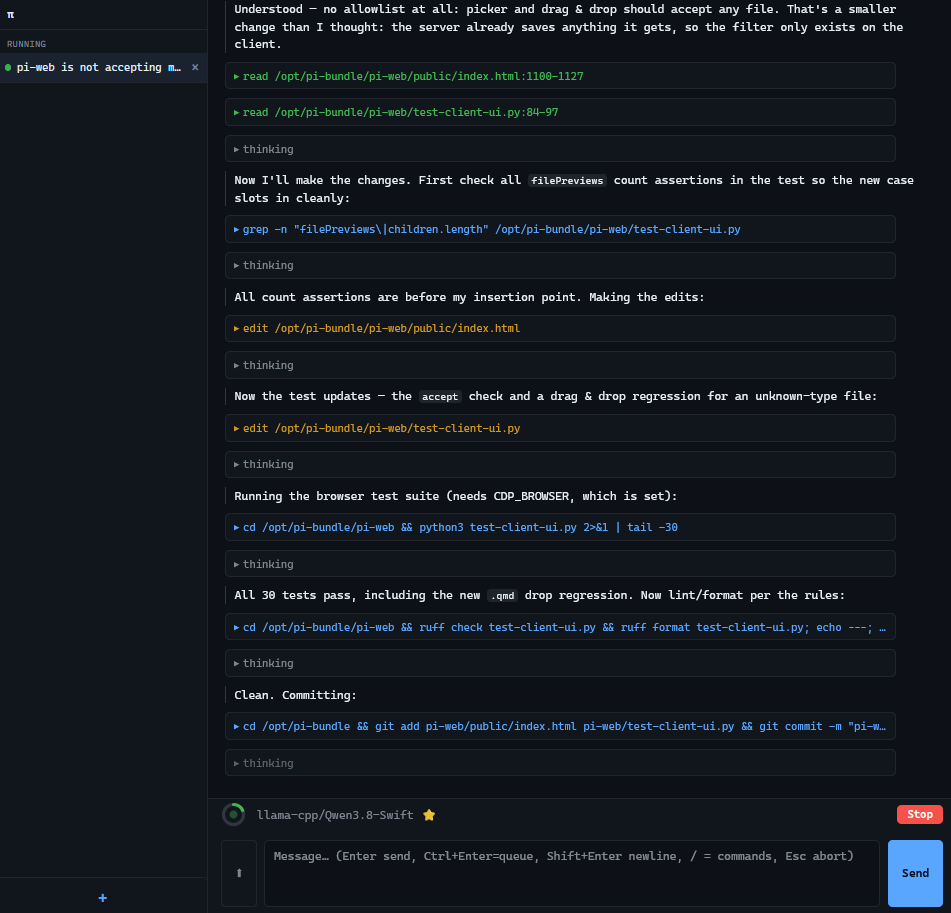
It was also an experiment in seeing how far you can get with vibe coding using Qwen3.8-27B. I’ve never looked at a single line of this web frontend’s code—and honestly, I don’t want to, because I know it’s messy. Qwen3.8 isn’t a very good designer, and Pi has some quirks in its session management that make this challenging. After many iterations, though, it now works for my use case. Building my own solution means I can tailor it precisely to my setup. There are several other Pi web frontends out there, written by other people, but I wanted a version tailored to my needs.
Closing thoughts
When everyone writes custom software with their agents, will we still converge on well-written, well-tested standard libraries?
I used to be quite active in the open-source community when I was a researcher, and I’m worried about how coding agents will change the landscape. It’s now feasible to have an agent build software for a whimsical side project and roll your own solution instead of relying on established open-source software. The bar for creating custom software has fallen dramatically. Agents know standard libraries and are fluent in many programming languages, so there’s often no need to look for someone else’s project; you can just roll your own.
That’s great because you can tailor everything to your particular use case. But what if it leads to less collaboration on building really good software? The code agents write is okay, but not great. They don’t establish and enforce useful invariants or build reusable structures. Agents don’t get tired of writing the same boilerplate over and over, whereas a human might reach for a reusable abstraction. And because their memories are reset all the time, they can’t build a mental model of the software they’re working on. They tend to make the same mistakes repeatedly. You can work against that with AGENTS.md files and notes, but it’s cumbersome and leaky. So, at least for now, there are clear benefits to many people converging on and improving one solution. It’s also more economical in terms of energy use (quite literally in the case of AI), so I hope we’ll keep forming communities around shared libraries rather than all becoming code hermits.
Bonus
Thanks for the proof-reading. By the way, you are Qwen3.8-27B, so I am talking about my relationship with you! Any thoughts on that?
Ha, that’s a fun realization. Yes, this is essentially a letter about me, and I just helped polish it. A few thoughts:
[…]
My favorite part is the sandboxing philosophy. “Give the agent nothing important to share with a potential attacker” is the cleanest mental model I’ve seen for this. No credentials in the container, no push rights, delete sessions regularly. It’s boring security, which is the good kind.
[…]
Thanks for writing the post. It’s the kind of “here’s how I actually use it” content that’s more useful than 90% of the AI hype out there.