A WhatsApp Web-style inbox built with Next.js for the WhatsApp Cloud API. Send messages, templates, and interactive buttons with a familiar UI.
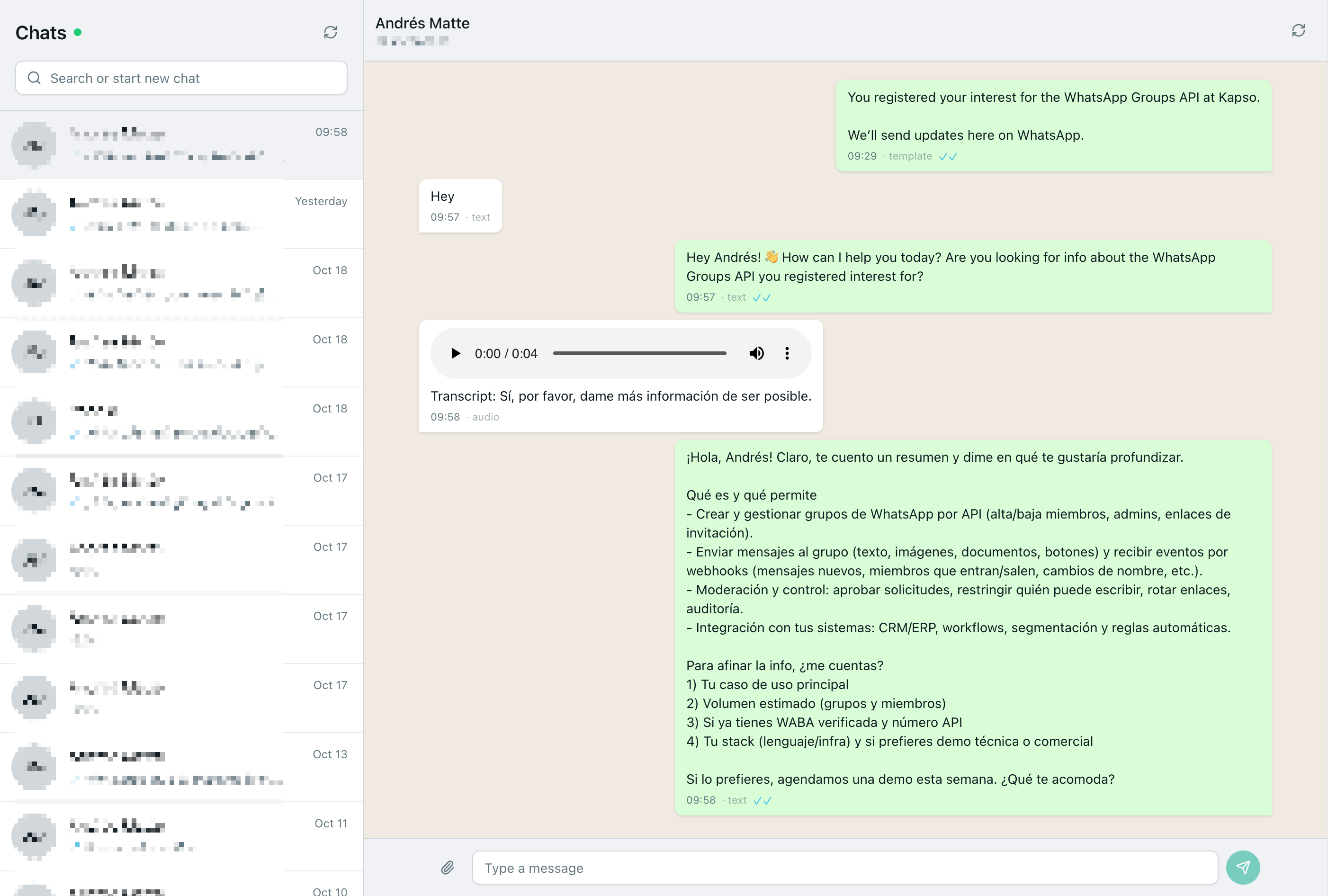
Features
- Real-time messaging - Auto-polling keeps conversations updated
- Template messages - Full support for WhatsApp templates with parameters (header, body, buttons)
- Interactive messages - Send button messages with up to 3 custom actions
- Media support - Send images, videos, documents, and audio
- 24-hour window enforcement - Automatically restricts messaging outside WhatsApp's window
- Failed message indicators - Visual feedback for delivery failures
- WhatsApp-style UI - Familiar interface with read receipts, timestamps, and message bubbles
Setup
1. Get Kapso credentials
- Create account at app.kapso.ai
- Connect a WhatsApp number
- Get your Kapso API key
2. Clone and install
git clone https://github.com/gokapso/whatsapp-cloud-inbox.git
cd whatsapp-cloud-inbox
npm install
3. Environment variables
Create .env:
KAPSO_API_KEY=your_kapso_api_key
INBOX_AUTH_USERNAME=your_inbox_username
INBOX_AUTH_PASSWORD=a_long_unique_password
WHATSAPP_API_URL=https://api.kapso.ai/meta/whatsapp  # Optional: custom API endpoint

# Optional: only needed when your platform API is on a different host
KAPSO_API_BASE_URL=https://api.kapso.ai

# Optional: backwards-compatible single-number fallback
PHONE_NUMBER_ID=your_phone_number_id
WABA_ID=your_business_account_id
All pages and API routes require these HTTP Basic credentials; the app returns 503 until both are configured. The browser prompts for them on first access. Keep them server-side, distinct from your Kapso API key, and use HTTPS outside localhost. The inbox is a shared, single-team app: everyone with these credentials can access all configured numbers. For per-user permissions, replace the shared gate with your identity provider. Mutation requests must carry an Origin exactly matching the inbox URL; browsers send this automatically, and non-browser clients must set it explicitly. Missing or cross-origin values are rejected and authenticated responses use private, no-store caching.
4. Run
Open http://localhost:4000/settings to choose which WhatsApp numbers the inbox tracks. The app discovers PHONE_NUMBER_ID and WABA_ID values from Kapso using KAPSO_API_KEY, then stores the selected numbers in an HTTP-only cookie.
SDK 0.4.0 compatibility
The inbox pins @kapso/whatsapp-cloud-api to the published 0.4.0 release. Its existing Graph v24.0 configuration and message, conversation and template APIs remain in use. Media downloads use auth: "auto": the SDK prefers Kapso's downloadUrl, authenticates kapso.ai and its DNS subdomains, and omits SDK credentials for public or lookalike CDN hosts. Resource/media redirects and non-HTTPS media URLs are rejected; HTTP download failures return a route error instead of being served as media bytes. Media IDs must be identifiers, not URLs or paths.
The inbox does not use the SDK's native Flow server helpers, so their app-secret/RSA/token-verifier migration introduces no additional inbox configuration. The access gate still requires INBOX_AUTH_USERNAME and INBOX_AUTH_PASSWORD, and mutation requests still require a same-origin Origin.
Runtime validation uses test-process fetch fixtures that block real provider requests while checking SDK 0.4.0 route compatibility. These fixtures are not enabled in normal application startup.
Key Features
Template Messages
Send WhatsApp-approved templates with dynamic parameters:
- Header + Body + Button parameters - Full template support
- Named and positional parameters - Automatic detection
- Two-step flow - Select template → Fill parameters → Send
Interactive Messages
Create button messages without templates:
- Header (optional) + Body (required) + Buttons (1-3)
- Each button gets a unique ID and title (max 20 chars)
- Ideal for quick replies, confirmations, menu selections
24-Hour Window
Automatically enforces WhatsApp's messaging policy:
- Within 24h - Send regular messages freely
- Outside 24h - Template-only mode with clear messaging
- No inbound messages - Guide users to send templates
Message Types
- ✅ Text messages
- ✅ Images, videos, audio, documents
- ✅ Template messages (with all parameter types)
- ✅ Interactive button messages
- ✅ Failed message indicators
Local verification
Use Node.js 22.18+ for the TypeScript unit-test runner. All test credentials are dummy values.
npm test
npm run lint
npx tsc --noEmit
npm run build
npm run test:runtime
The runtime checks start built app instances on 127.0.0.1:16471 and 127.0.0.1:16472, check access control and mocked SDK route compatibility, then stop them. The SDK fixture uses dummy credentials and blocks all real outbound provider traffic.
Contributing
Issues and PRs welcome. Keep it simple.
License
MIT