Contents
Every modern iOS, macOS, watchOS, and tvOS application uses Asset Catalogs to manage images, colors, icons, and other resources. When you build an app with Xcode, your .xcassets folders are compiled into binary .car files that ship with your application. Despite being a fundamental part of every Apple app, there is little to none official documentation about this file format.
In this post, I'll walk through the process of reverse engineering the .car file format, explain its internal structures, and show how to parse these files programmatically. This knowledge could be useful for security research and building developer tools that does not rely on Xcode or Apple's proprietary tools.
As part of this research, I've built a custom parser and compiler for .car files that doesn't depend on any of Apple's private frameworks or proprietary tools. To make this research practical, I've compiled my parser to WebAssembly so it runs entirely in your browser, so no server uploads required. You can drop any .car file into the interactive demo below to explore its content. I'm considering open-sourcing these tools, but no promises yet!
Join the discussion on Lobsters or Hacker News, or reach out on X.
What is a .car File?
When you call UIImage(named: "My in Swift (or [UIImage image in Objective-C), the private Core opens your app's Assets. file and retrieves the appropriate image for the current device context (screen scale, appearance mode, size class, etc)
You can inspect car files using Apple's closed-source tools:
- actool: Compiles asset catalogs (usually invoked by Xcode)
- assetutil: Processes and inspects car files
Running assetutil -I Assets. produces a JSON dump of all assets:
| |
The Foundation: BOM File Format
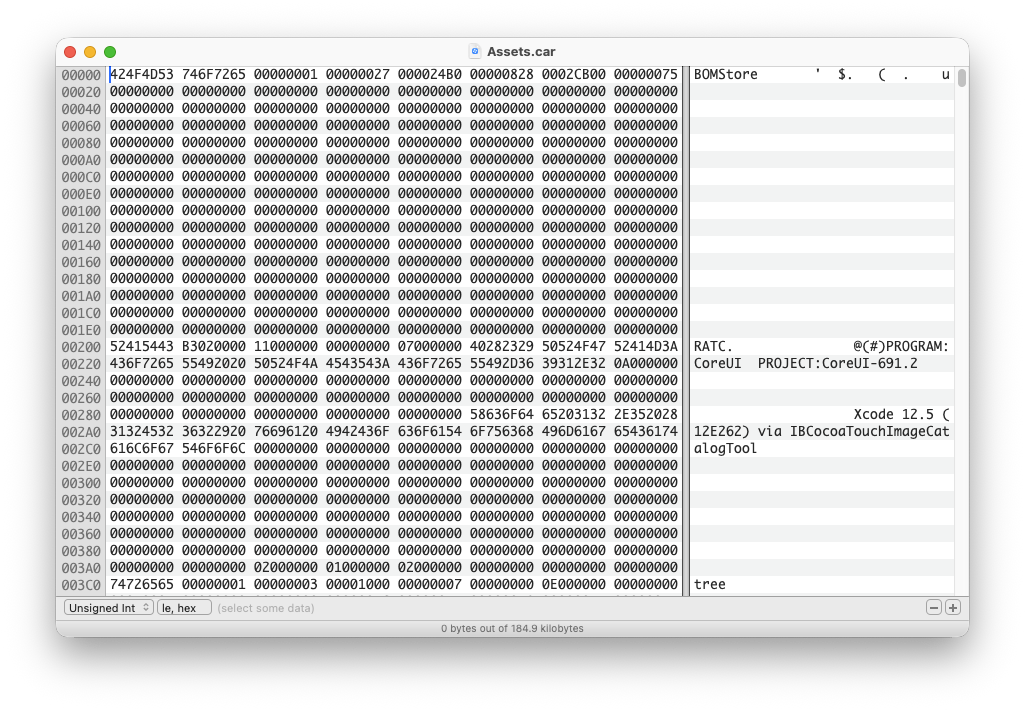
Opening a .car file in a hex editor immediately reveals its foundation: the file begins with the ASCII magic BOMStore. BOM (Bill of Materials) is an old format still used today.
Offset  00 01 02 03 04 05 06 07  ASCII
0x0000  42 4F 4D 53 74 6F 72 65  BOMStore
0x0008  XX XX XX XX XX XX XX XX  [version, info, ...]
Looking at CoreUI's BOMStorage function in a disassembler, we can see the magic validation:
// From BOMStorageOpenWithSys (0x18a69da5c)
if ( (unsigned int)BOMStreamReadUInt32(v8) == 1112493395   // 0x424F4D53 = "BOMS"
  && (unsigned int)BOMStreamReadUInt32(v9) == 1953460837 ) // 0x746F7265 = "tore"
{
    UInt32 = BOMStreamReadUInt32(v9);  // Version, must be 1
    if ( UInt32 == 1 ) {
        // ... allocate and parse storage
    }
}
A BOM file provides a hierarchical key-value store with two main primitives:
- Blocks: Raw binary blobs accessed by numeric index
- Trees: B+ tree structures for ordered key-value lookups
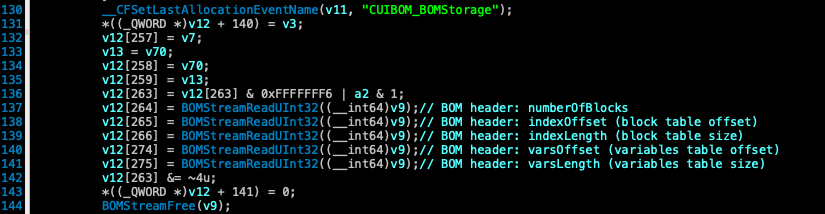
From the BOMStorage logic shown above, we can infer the overall layout of a BOM file. It begins with a fixed-size header, followed by a block index table and a variables table.
The BOM header structure (32 bytes, big-endian):
struct BOMStoreHeader {
    char     magic[8];       // "BOMStore"
    uint32_t version;        // Usually 1
    uint32_t numberOfBlocks;
    uint32_t indexOffset;
    uint32_t indexLength;
    uint32_t varsOffset;
    uint32_t varsLength;
};
The Block Index is an array of (offset, length) pairs providing random access to any block by its numeric ID. The Variables Table maps string names like "CARHEADER" and "RENDITIONS" to block indices.
CAR-Specific Blocks and Trees
While standard BOM files store installer package manifests, .car files repurpose the container for asset storage. Here are the named blocks and trees found in a typical car file:
Named Blocks
| Block Name | Size | Purpose |
|---|---|---|
CARHEADER | 436 bytes | Version info, rendition count, UUID |
EXTENDED_METADATA | 1028 bytes | Build tool info, platform details |
KEYFORMAT | Variable | Defines attribute ordering for keys |
CARGLOBALS | Variable | Global settings (optional) |
Named Trees (B+ Trees)
| Tree Name | Purpose |
|---|---|
RENDITIONS | Asset key → CSI data block mappings |
FACETKEYS | Asset name → attribute token mappings |
APPEARANCEKEYS | Appearance name → ID mappings (Dark Mode) |
BITMAPKEYS | Bitmap-specific metadata |
COLORS, FONTS, FONTSIZES | Type-specific indices |
The CARHEADER block contains metadata about the entire asset catalog. It has a fixed size of 436 bytes. Unlike the BOM container (big-endian), CARHEADER fields are little-endian, with CoreUI calling _swap when it detects the big-endian magic RATC:
| |
The KEYFORMAT Block
The KEYFORMAT block is crucial for understanding how asset keys are structured. CoreUI validates this block and has a fallback when it's malformed:
// From CUISystemThemeRenditionKeyFormat (0x18a6b20a8)
const char *CUISystemThemeRenditionKeyFormat()
{
  return "tmfk";  // Magic identifier for system key format
}

// From validatekeyformat (0x18a749094)
// Checks for KEYFORMATWORKAROUND block, validates attribute IDs < 0x18 (24)
The format begins with magic kfmt (or tmfk depending on byte order):
struct renditionkeyfmt {
    uint32_t tag;                          // 'kfmt' (0x6B666D74)
    uint32_t version;                      // Format version
    uint32_t maximumRenditionKeyTokenCount; // Number of attributes
    uint32_t renditionKeyTokens[];         // Array of attribute type IDs
}
The rendition array defines which attributes are stored in each rendition key and in what order. From the disassembler's string references, here are the attribute types (the CUITheme function maps indices 1-28 to these names):
| |
Note: The CUITheme function validates that attribute IDs must be in range 1-28 ((a1 - 1) > 0x1B returns “UNKNOWN”). The validatekeyformat function also checks that all attribute IDs are below 24 (0x18) for older format compatibility.
The idiom values (from kCore strings in the binary):
| |
A typical KEYFORMAT might define 18 attributes, meaning each rendition key is 18 * 2 = 36 bytes (each attribute value is stored as a uint16_t).
The RENDITIONS Tree
The RENDITIONS tree is the heart of the .car file and as far as I can tell it's a B+ tree where:
- Keys: Rendition attribute values matching the
KEYFORMATlayout - Values: Block indices pointing to CSI (Core Structured Image) data
B+ Tree Node Structure
The tree header begins with magic "tree" (0x74726565), validated in _BOMTree. Each tree node has a 12-byte header:
struct BOMTreeNodeHeader {
    uint16_t isLeaf;
    uint16_t count;
    uint32_t forwardLink;
    uint32_t backwardLink;
}
The forward/backward pointers are the key B+ tree characteristic: leaf nodes are linked together for efficient sequential traversal without re-traversing from the root.
Leaf nodes contain the actual key-value pairs. Each entry is 8 bytes:
struct BOMTreeEntry {
    uint32_t keyBlockID;   // Block containing the key
    uint32_t valueBlockID; // Block containing CSI data (for leaves)
                           // or child node block ID (for branches)
};
Branch nodes use the same structure but value points to child tree nodes.
Tree Traversal Algorithm
The logic in BOMTree shows how CoreUI creates tree iterators:
| |
The BOMTree function, shown below, handles advancing through the tree. It increments the current index, checks if we've exhausted the current node's entries, and follows the forward pointer to move to the next leaf node. When no more nodes remain, it sets the end-of-tree flag.
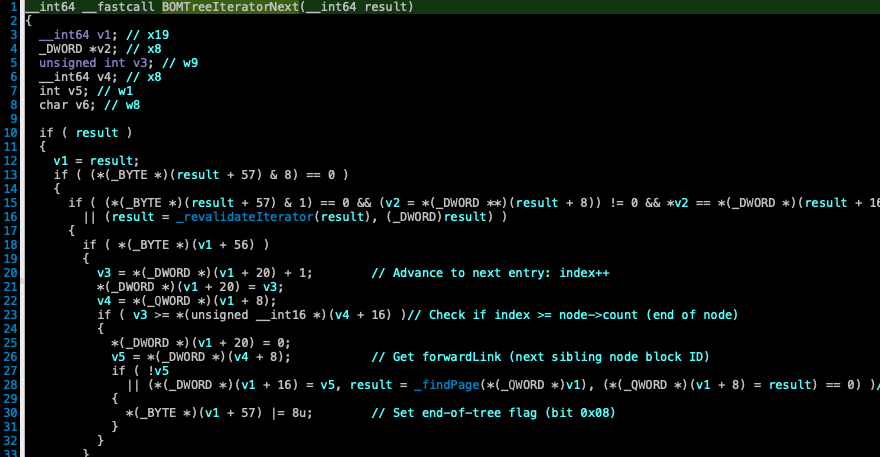
The tree structure uses the flag at offset 356 to indicate whether keys are stored inline or in separate blocks.
To enumerate all assets:
- Read the tree header block → get root node block ID
- Descend to the leftmost leaf by following first child pointers
- Iterate through leaf entries, extracting
(key, value)pairs - Follow
forwardto traverse to the next leafLink - Repeat until
forwardis 0 (end of tree)Link
CSI: Core Structured Image
Each asset's data is stored in a CSI block. Analyzing init reveals how CoreUI determines the rendition class:
// From -[CUIThemeRendition initWithCSIData:forKey:version:] (0x18a75a8cc)
v9 = (unsigned __int16 *)objc_msgSend(a3, "bytes");
v10 = objc_msgSend(
    objc_opt_class(a1),
    "renditionClassForRenditionType:andPixelFormat:",
    v9[18],           // offset 36: layout/rendition type
    *((unsigned int *)v9 + 6));  // offset 24: pixel format
This tells us key offsets in the CSI header:
- Offset 24 (bytes 24-27):
pixelas uint32Format - Offset 36 (bytes 36-37):
layoutas uint16
The full 184-byte CSI header structure (little-endian fields):
| |
Pixel Format Magic Values
The constants checked in _CUITheme give us the pixel formats:
// Pixel format values (kind of like fourcc codes)
#define PIXEL_ARGB    0x41524742  // 'ARGB' / 'BGRA' - 32-bit ARGB
#define PIXEL_RGBW    0x52474257  // 'RGBW' / 'WBGR' - 32-bit with wide gamut
#define PIXEL_GA16    0x47413136  // 'GA16' / '61AG' - 16-bit grayscale+alpha
#define PIXEL_GA8     0x47413820  // 'GA8 ' / ' 8AG' - 8-bit grayscale+alpha
#define PIXEL_RGB5    0x52474235  // 'RGB5' / '5BGR' - 16-bit RGB (5-5-5-1)
The layout field identifies the asset type. The _initialize function reveals the type ranges:
| |
TLV (Type-Length-Value) Metadata
Following the CSI header is a TLV section containing extended metadata. _CUITheme shows the parsing:
| |
struct TLVEntry {
    uint32_t type;
    uint32_t length;
    uint8_t  data[];
};
Common TLV types handled by CoreUI:
TLV type numbers are a separate namespace from layout types. For example, TLV type 1010 (InternalLink metadata) is different from layout type 1010 (MultisizeImageSet). Layout types identify the rendition class (from CSI header offset 36), while TLV types tag metadata entries within the TLV section.
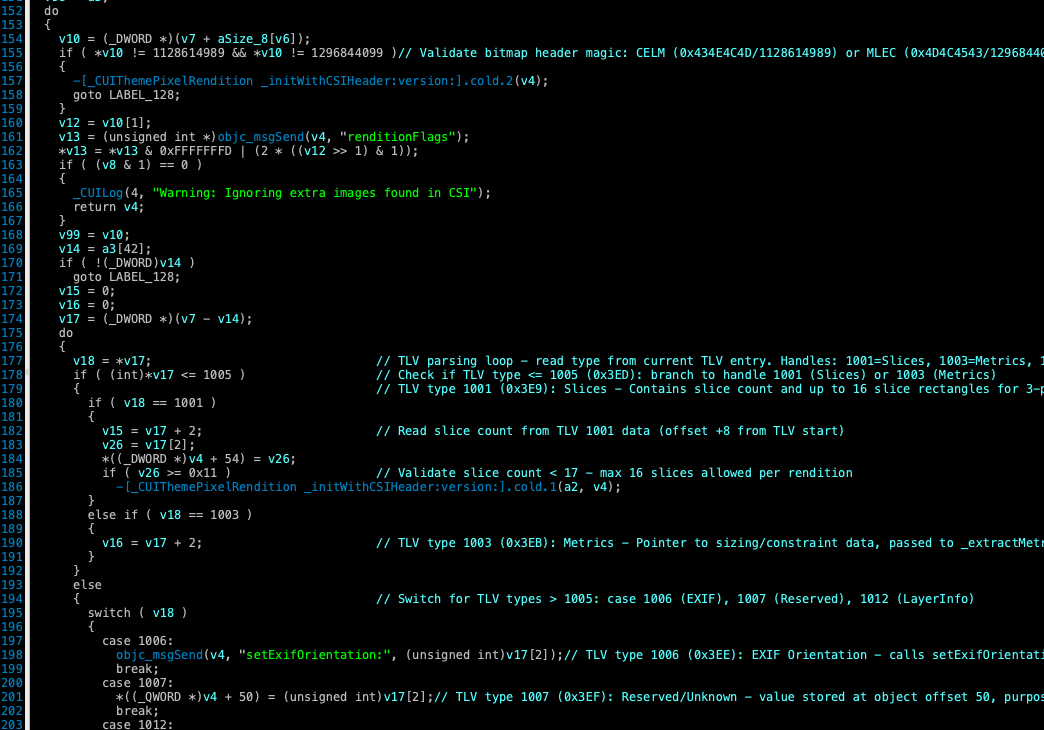
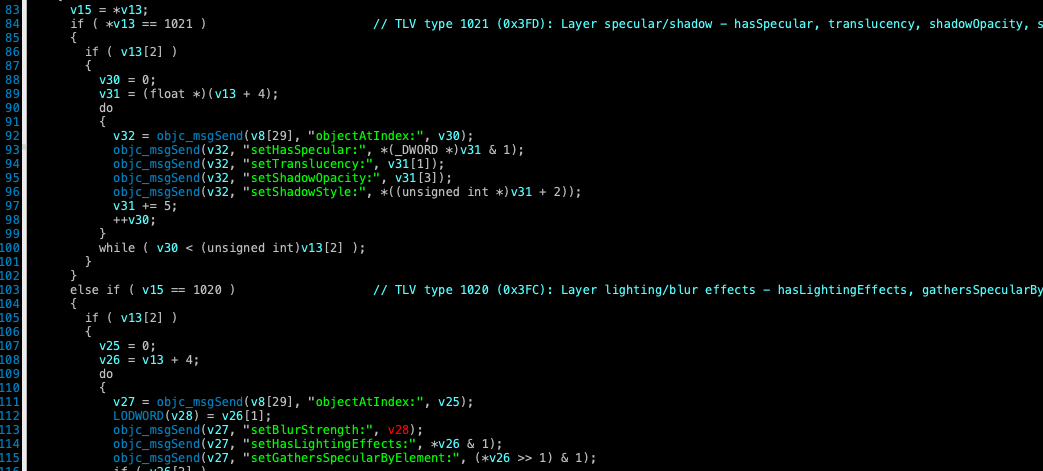
Note: The TLV namespace has gaps, types 1002, 1004, 1005, and 1013-1019 don't exist as immediate constants in the CoreUI binary. The table below only includes TLV types CoreUI actually handles. The “Name” column contains descriptive names I assigned based on observed behavior so they're not from the CoreUI binary.
| Type | Decimal | Name | Purpose | Seen In |
|---|---|---|---|---|
| 0x3E9 | 1001 | Slices | Slice count + rectangles (max 16) for 3/9-part | _CUIThemePixelRendition |
| 0x3EB | 1003 | Metrics | Sizing constraints, passed to _extractMetrics | _CUIThemePixelRendition |
| 0x3EE | 1006 | EXIFOrientation | Image rotation/flip (1-8), calls setExifOrientation: | _CUIThemePixelRendition |
| 0x3EF | 1007 | Reserved | Unknown, stored at object offset 50 | _CUIThemePixelRendition |
| 0x3F0 | 1008 | ExternalPath | UTF8 path string for external file | _CUIExternalLinkRendition |
| 0x3F1 | 1009 | LegacyLayerEntries | I guess it's a fallback for layer entries | _CUILayerStackRendition |
| 0x3F2 | 1010 | InternalLink | Reference key to another rendition (used by _CUIInternalLinkRendition) | _CUIInternalLinkRendition |
| 0x3F3 | 1011 | SliceRects | Slice rectangle coordinates | _CUIInternalLinkRendition |
| 0x3F4 | 1012 | LayerInfo | Layer stack entries: frame, opacity, blendMode, fixedFrame, referenceKey | _CUIThemePixelRendition, _CUILayerStackRendition |
| 0x3FC | 1020 | LayerEffects | Lighting/blur: hasLightingEffects, blurStrength, gradientName | _CUILayerStackRendition |
| 0x3FD | 1021 | LayerSpecular | Specular/shadow: hasSpecular, translucency, shadowOpacity, shadowStyle | _CUILayerStackRendition |
Rendition Data Types
After the header and TLV section comes the actual asset data. The pixel and layout fields determine how to interpret it.
CUIRawDataRendition (pixelFormat = ‘DATA’)
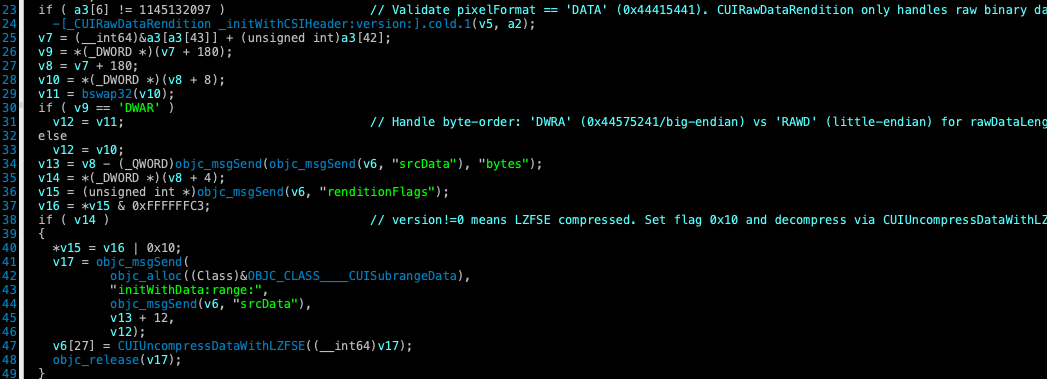
Used for arbitrary binary data (PDFs, text files, JSON, etc.). CoreUI validates the pixel format first:
// From _CUIRawDataRendition _initWithCSIHeader:version: (0x18a756e9c)
if ( a3[6] != 1145132097 )   // pixel format must be 'DATA' (0x44415441)
    // Error: wrong pixel format
The raw data header starts at CSI offset 180 (after the 184-byte header minus 4):
struct CUIRawDataHeader {
    uint32_t tag;           // 'RAWD' (0x44574152) - may need byte-swap detection
    uint32_t version;       // 0 = uncompressed, non-zero = LZFSE compressed
    uint32_t rawDataLength; // Size of following data (byte-swapped if tag == 'RAWD')
    uint8_t  rawData[];     // The actual file contents (12 bytes after tag)
}
The byte-order handling is interesting because CoreUI checks if tag == 0x44574152 (‘RAWD’) and if so, applies bswap32 to the length field:
// From 0x18a756f04
v10 = *(_DWORD *)(header + 8);   // Read rawDataLength
v11 = bswap32(v10);              // Compute swapped version
if ( tag == 0x44574152 )         // 'RAWD' (1146569042 decimal)
    length = v11;                // Use byte-swapped length
else
    length = v10;                // Use length as-is
If version field is non-zero, the data is LZFSE compressed:
if ( v14 ) {  // version != 0 means compressed
    *v15 = v16 | 0x10;  // Set renditionFlags bit 4 (compressed)
    // Create subrange starting 12 bytes after header (tag + version + length)
    v17 = [_CUISubrangeData initWithData:range: srcData, offset+12, length];
    v6[27] = CUIUncompressDataWithLZFSE(v17);  // Decompress
} else {
    *v15 = v16;  // Uncompressed
    v6[27] = [_CUISubrangeData initWithData:range: srcData, offset+12, length];
}
CUIRawPixelRendition (pixelFormat = ‘JPEG’ or ‘HEIF’)
Stores compressed images directly:
struct CUIRawPixelRendition {
    uint32_t tag;           // 'RAWD' (same as raw data)
    uint32_t version;
    uint32_t rawDataLength;
    uint8_t  rawData[];     // JPEG or HEIF bitstream
}
CUIThemeColorRendition (layout = 1009 / 0x3F1)
Named colors are stored with component values. _CUITheme performs the magic validation:
| |
| |
The color space flags in bits 8-10:
0x000: Basic color, components follow immediately0x100: Extended color with name string after components
CUIThemePixelRendition (pixelFormat = ‘ARGB’, ‘GA8’, etc.)
The most complex type, used for PNG-derived images. CoreUI validates the bitmap header:
// From _CUIThemePixelRendition _initWithCSIHeader:version: (0x18a758dc4)
// Bitmap data at: csiHeader + bitmapOffsets[i] where offsets start at header+176
v10 = (_DWORD *)(v7 + aSize_8[v6]);  // aSize_8 = &csiHeader[44] (bitmap offset array)
if ( *v10 != 1128614989 && *v10 != 1296844099 )  // Must be CELM or MLEC
{
    // Error: invalid bitmap header
}
v12 = v10[1];  // Read flags field
*renditionFlags = (*renditionFlags & 0xFFFFFFFD) | (2 * ((v12 >> 1) & 1));  // Extract bit 1 → vector flag
Converting these magic values:
1128614989=0x43454C4D→ bytes4D 4C 45 43→ “MLEC”1296844099=0x4D4C4543→ bytes43 45 4C 4D→ “CELM”
struct CUIThemePixelRendition {
    uint32_t tag;             // 'CELM' (0x4D4C4543) or 'MLEC' (0x43454C4D)
    uint32_t flags;           // Bit 1 = vector rendition flag (SVG/PDF source)
    uint32_t compressionType; // Compression algorithm (0-12, see table below)
    uint32_t rawDataLength;   // Size of (compressed) pixel data
    uint8_t  rawData[];       // Pixel data (format depends on compressionType)
}
The pixel format determines the color space handling. From the switch statement in that method:
| pixelFormat | Value | Bytes | Color Space Selection |
|---|---|---|---|
| ARGB | 0x41524742 | 42 47 52 41 | sRGB or from colorSpace field bits 0-3 |
| RGBW | 0x52474257 | 57 42 47 52 | Extended/wide gamut, P3 variants |
| RGB5 | 0x52474235 | 35 42 47 52 | 16-bit RGB (5-5-5-1) |
| GA8 | 0x47413820 | 20 38 41 47 | 8-bit grayscale + alpha |
| GA16 | 0x47413136 | 36 31 41 47 | 16-bit grayscale + alpha |
Compression types (from CUIConvert at 0x18a6ddf4c, reading the string table at 0x1E6D7E0E0):
| Value | Name (from binary) | Notes |
|---|---|---|
| 0 | uncompressed | Raw pixel bytes |
| 1 | rle | PackBits variant |
| 2 | zip | Uses zlib deflate |
| 3 | lzvn | Apple's lightweight compressor |
| 4 | lzfse | Apple's high-ratio compressor |
| 5 | jpeg-lzfse | JPEG-in-ARGB with LZFSE wrapper |
| 6 | blurred | Special blur processing |
| 7 | astc | Adaptive Scalable Texture Compression |
| 8 | palette-img | Indexed/quantized color (see below) |
| 9 | hevc | HEVC/H.265 encoded |
| 10 | deepmap-lzfse | Depth map with LZFSE compression |
| 11 | deepmap2 | Alternative depth map format |
| 12 | dxtc | S3 Texture Compression (DXT) |
Compression Architecture
CoreUI imports compression functions from Apple's compression libraries:
| |
Note: The compression type is stored in the CSI header's compression field (types 0-12), and CoreUI explicitly passes the algorithm to libcompression.
The decompression routing in _BOMFile (0x18a6b64cc):
// Compression type -> algorithm mapping
switch ( compressionType ) {
    case 1:  compression_stream_init(stream, op, COMPRESSION_ZLIB);   break;
    case 3:  compression_stream_init(stream, op, 0x900);  break;  // LZVN
    case 4:  compression_stream_init(stream, op, COMPRESSION_LZFSE);  break;
}
And in BOMFile (0x18a6b65ac), streaming decompression handles each type:
if ( compressionType == 1 ) {
    // Use zlib's inflate()
    inflate(z_stream, Z_NO_FLUSH);
} else if ( compressionType == 3 || compressionType == 4 ) {
    // Use libcompression's streaming API
    compression_stream_process(stream, isFinished);
}
The CELM/MLEC Wrapper
For RLE-compressed data (compression type 1), the CELM wrapper provides per-row offset tables. The expand function (0x18a755844) calls pk_decompress (0x18a6c99dc):
// From expandCSIBitmapData at 0x18a7559f8:
if ( compressionType == 1 ) {  // v10 == 1
    pk_decompressData(a2 + 4, destBuffer, srcSlice, srcHeight,
                      dstWidth, dstHeight, rowBytes,
                      *a2 == 1296844099);  // Check if magic == "CELM" (0x4D4C4543)
}
The last parameter (*a2 == 0x4D4C4543) determines endianness handling. Inside pk_decompress:
| |
The RLE format uses a run-length encoding where each entry has a 4-byte header:
- High byte (0x80): Literal run - repeat single value N times
- Other values: Copy N bytes from source
From __decompress (0x18a6c9ad0):
v11 = *entry;                    // Read 4-byte header
if ( isCELM ) v11 = bswap32(v11);
runLength = v11 & 0xFFFFFF;      // Low 24 bits = run length
if ( HIBYTE(v11) == 0x80 ) {     // High byte == 0x80 means fill
    CGBlt_fillBytes(4 * runLength, 1, entry[1], dest);  // Repeat value
    entry += 2;                  // Skip header + fill value
} else {
    CGBlt_copyBytes(4 * runLength, 1, &entry[1], dest); // Copy pixels
    entry += runLength + 1;      // Skip header + data
}
The KCBC Chunked Bitmap Format
For LZFSE-compressed bitmaps (compression types 3 and 4), large images are split into multiple independently-compressed chunks within the MLEC raw payload. Each chunk represents a horizontal slice of the image. The chunks use a KCBC header:
struct KCBCChunkHeader {
    uint32_t magic;          // 'KCBC' (0x4B434243)
    uint8_t  reserved[8];    // Reserved/unknown
    uint32_t chunkHeight;    // Number of pixel rows in this chunk
    uint32_t compressedSize; // Size of following LZFSE compressed data
};
// Total header size: 20 bytes
// Immediately followed by compressedSize bytes of LZFSE (bvx2...) stream
The full layout inside the MLEC rawData region:
MLEC rawData[] (when compressionType == 3 or 4):
  ┌─────────────────────────────────────────┐
  │ KCBCChunkHeader  (20 bytes)             │  ← chunk 0
  │ LZFSE stream     (compressedSize bytes) │
  ├─────────────────────────────────────────┤
  │ KCBCChunkHeader  (20 bytes)             │  ← chunk 1
  │ LZFSE stream     (compressedSize bytes) │
  ├─────────────────────────────────────────┤
  │ ...                                     │  ← repeat until all rows covered
  └─────────────────────────────────────────┘
Each chunk's LZFSE stream decompresses to chunk bytes of raw pixel data (possibly with row padding for alignment). The decompressed chunks need to be concatenated row-by-row to reconstruct the full image. The number of chunks is not stored explicitly so the iteration continues until all image rows have been decoded.
When the decompressed data size exceeds chunk, the source rows contain alignment padding that needs to be stripped when copying to the destination buffer.
The Paletted/Quantized Image Format
A particularly interesting format is the quantized image (compression type 8). CUIUncompress (0x18a6c68e4) reveals the format details. The entire payload is LZFSE compressed, and CoreUI uses streaming decompression to read it:
| |
The format structure (note: the entire payload is LZFSE compressed, these following fields are read from the decompressed stream):
struct QuantizedImageData {
    // All fields below are INSIDE the LZFSE compressed stream
    uint32_t magic;        // 0xCAFEF00D (check if offset 0 != -889262067)
    uint32_t version;      // Must be < 2 otherwise error (Decoded version is higher than supported)
    uint16_t paletteCount; // Number of colors, max 4096 (check if v41 > 0x1000u)
    // Followed by:
    //   - Palette: paletteCount * 4 bytes (ARGB) or * 8 bytes (RGBW)
    //   - Indices: bit-packed pixel indices (variable width based on palette size)
};
The compressed payload must be decompressed with LZFSE using streaming decompression:
| |
FACETKEYS: Asset Name Resolution
The FACETKEYS tree maps human-readable asset names to their rendition attributes:
- Keys: Null-terminated asset names (“MyIcon”, “ButtonBackground”)
- Values:
renditionkeytokenstructures
struct renditionkeytoken {
    uint16_t cursorHotSpotX;
    uint16_t cursorHotSpotY;
    uint16_t numberOfAttributes;
    struct {
        uint16_t name;
        uint16_t value;
    } attributes[];
}
This allows UIImage(named:) to find all renditions for an asset name by matching against the RENDITIONS tree keys.
Internal Link Renditions
Some renditions don't contain actual image data, they reference other renditions. This enables asset reuse and deduplication.
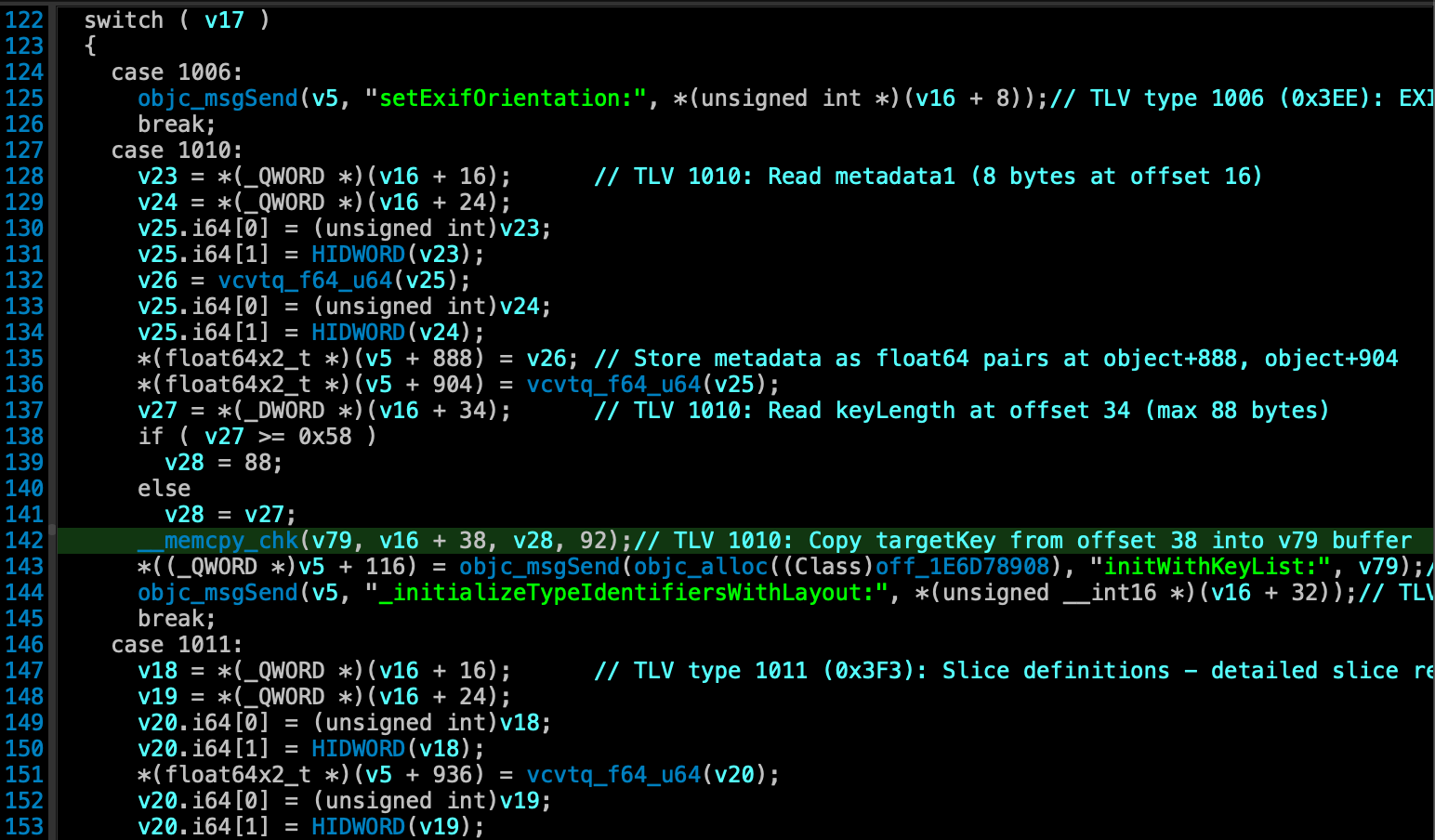
_CUIInternal (0x18a7582bc) shows how these are parsed:
| |
Internal links are identified by TLV type 1010 (0x3F2) and contain:
struct InternalLinkTLV {
    uint32_t type;           // 0: 1010 (0x3F2)
    uint32_t length;         // 4: Total TLV data length
    uint64_t reserved1;      // 8: Unknown (not parsed)
    uint64_t metadata1;      // 16: Metadata (converted to floats)
    uint64_t metadata2;      // 24: Metadata (converted to floats)
    uint16_t layout;         // 32: Layout type of the linked rendition
    uint32_t keyLength;      // 34: Length of target key (max 88 bytes)
    uint8_t  targetKey[];    // 38: Rendition key tokens (4 bytes each, null-terminated)
};
When CoreUI encounters an internal link, it looks up the target key in RENDITIONS and loads that asset instead. This is commonly used for dark mode variants that share the same base image.
Putting It All Together
Here's the high-level parsing flow:
| |
Interactive Demo
I've compiled my parser to WebAssembly so you can explore .car files directly in your browser. Drop any Assets. file to see its structure:
Loading parser...
Drop your .car file here
or click to browse
Reverse Engineering Methodology
For those interested in doing similar research, here's the approach I used:
- Extract CoreUI from the dyld shared cache: On modern macOS/iOS, system frameworks are pre-linked into a shared cache. Use the ipsw tool to extract them:
ipsw dyld extract dyld_shared_cache_arm64e \
    /System/Library/PrivateFrameworks/CoreUI.framework/CoreUI \
    --output ./Extracted_CoreUI
Load the extracted CoreUI.framework into a disassembler: Analyze the extracted binary as the original path may not be accessible.
Search for relevant function names: CoreUI uses clear Objective-C naming like
_CUITheme,Rendition _CUIRaw,Data Rendition BOMStorage*Cross-reference key strings: Search for strings like “CARHEADER”, “KEYFORMAT”, “RENDITIONS”, “FACETKEYS” to find parsing code
Follow the initialization chain: Start with
init→With Path: _common→ look for BOM and tree operationsInit Verify magic values: Magic checks show up as integer comparisons; convert them to hex/ASCII to identify format constants
Map struct offsets: Pointer arithmetic (like
v9[18]or*((unsigned int *)v9 + 6)) reveals field offsets
Key functions analyzed for this post:
BOMStorage(0x18a69da5c) - BOM magic validationOpen With Sys CUITheme(0x18a75a8cc) - CSI header parsingRendition init With CSIData: for Key: version: _CUITheme(0x18a758dc4) - Bitmap data extractionPixel Rendition _init With CSIHeader: version: CUIUncompress(0x18a6c68e4) - Palette image decompressionQuantized Image Data BOMTree(0x18a69fe04) - B+ tree traversalIterator New
Prior Art and References
This research builds on previous work by others in the community:
- Timac's 2018 deep dive - The foundational reference for .car parsing
- The Apple Wiki's CoreUI page - Community documentation of the framework
- iineva's BOM implementation - A BOM parser in Go
Tools for working with car files:
assetutil -I: Apple's official inspection toolactool --print-contents: Dump asset catalog info during builds
Conclusion
What started as a hex dump showing BOMStore turned into a journey through nested containers, B+ trees, TLV metadata, and bunch of compression schemes. I find this .car format is fairly complex, but understanding its internals opens up many possibilities.
For security researchers, this complexity might actually be a feature. Nested parsers and custom compression algorithms to create a rich attack surface. For tool builders, understanding these internals means you can build asset extractors, catalog editors, or cross-platform readers without depending on Apple's closed-source tooling.
The WebAssembly demo above is just one example of what's possible when we understand the format rather than relying on Apple's tools.
Feel free to reach out with questions or corrections, as feedback is welcome. The structures documented here are based on macOS Version 26.2 (25C56) files and may evolve in future releases.