Why the example
is a product.
The four other examples are apps around a company’s product: a pricing calculator, webinar sign-ups, discount approvals and a status page. Kitewell is the product. Its customers book a package on Kitewell’s site, and two teams outside engineering own pages of that booking. Sales owns the package and the terms, and product owns the workspace a customer starts with.
Letting sales and product change the product is a radical change in how a company works. AppOS is the way to make it safe. Engineering keeps the prices, the rules and the booking in a platform it owns, and each team ships its pages as an app that can do only what its grants allow.
Kitewell, its customers and its people are made up, and nobody pays. The flow ends with a booking, and the invoices go out elsewhere. The source is in kitewell/ on the main branch.
Five steps,
three owners.
A customer books in five steps. Engineering decided the steps and their order, and each step has one owner. Review and book is always engineering’s page, because that is where the customer agrees to a price.
All five pages look alike because the three teams copy one stylesheet. AppOS leaves the look to each app.
kitewell / packages app / sales
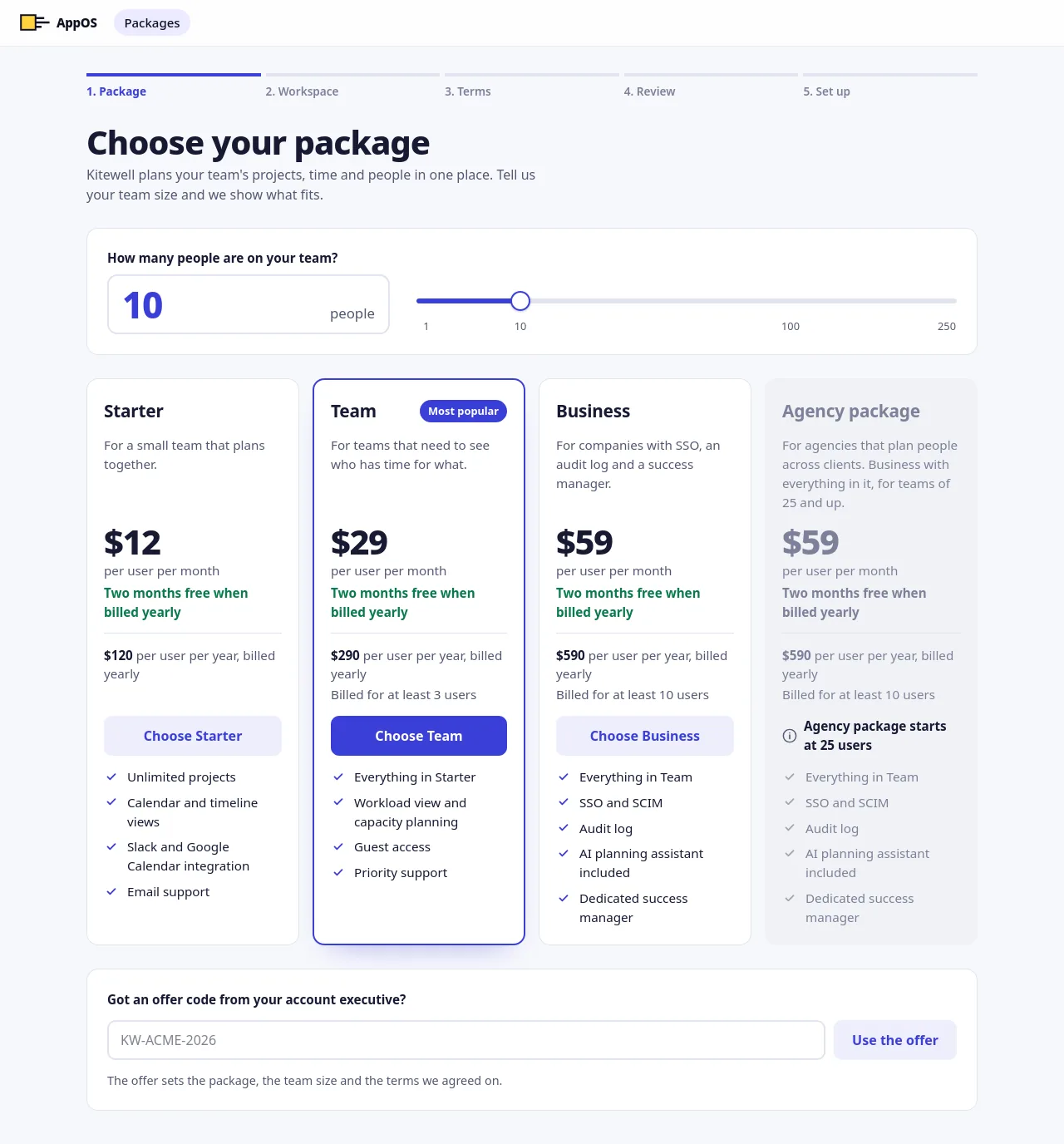
Sales wrote the packages app at /packages in Rust. The team size and the slider update the cards through htmx, and the prices come from the kit.
kitewell / workspace app / product
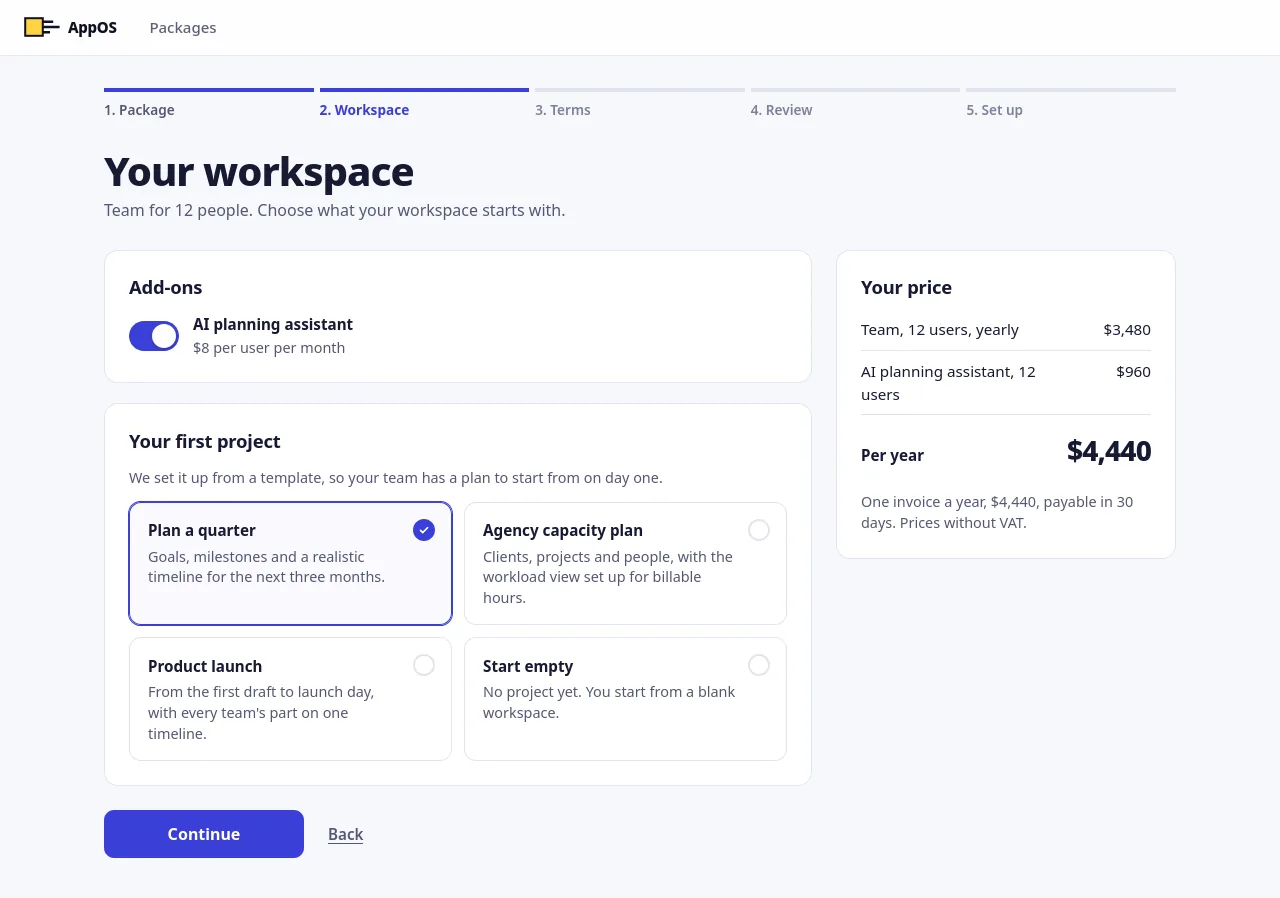
Product wrote the workspace app at /workspace/configure in TypeScript. Each switch saves at once, and the price beside it follows.
kitewell / packages app / sales
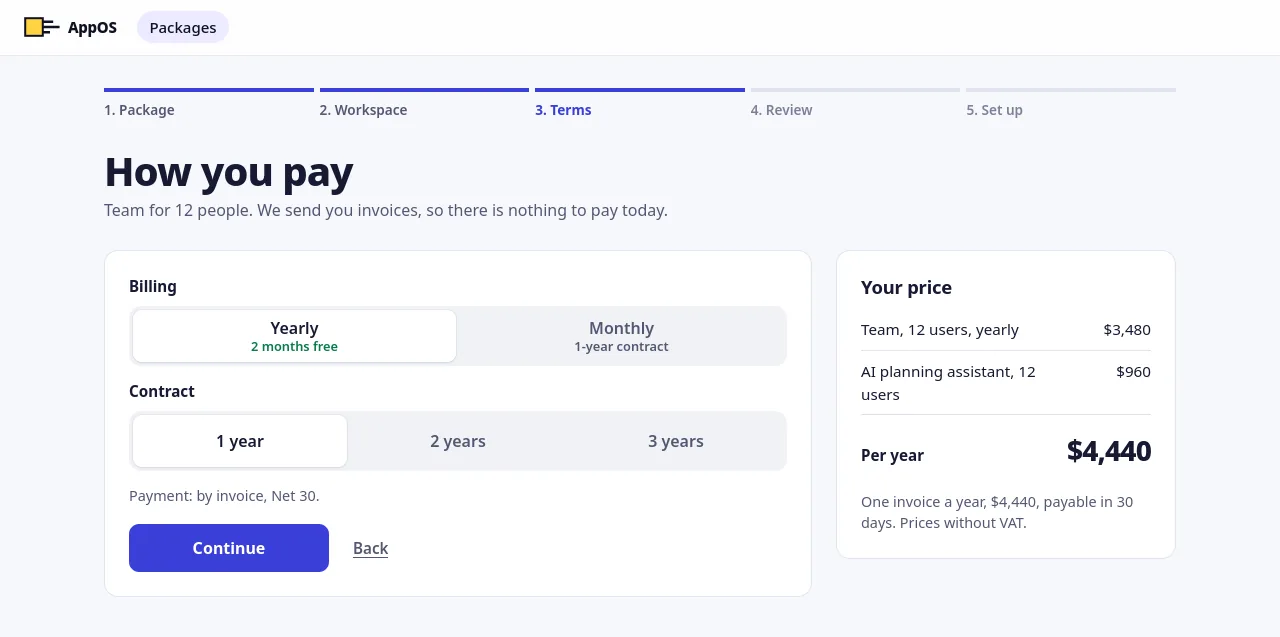
The packages app also has the terms step, at /packages/terms. Sales decides which terms the page offers, and the kit refuses terms it doesn’t allow.
kitewell / the platform’s page / engineering
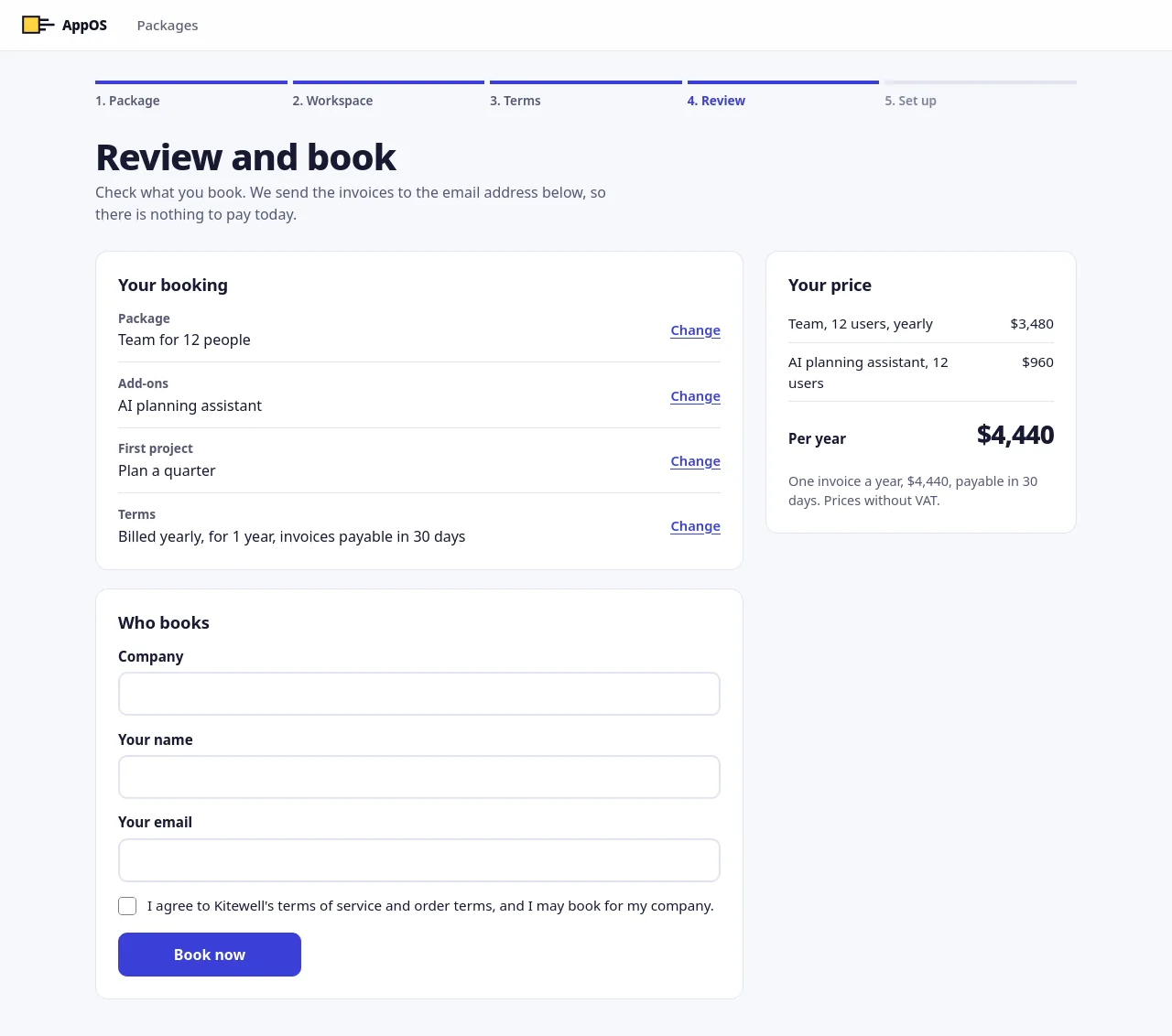
Engineering wrote the review page at /book/<draft> in Rust, as the kit’s own page. The customer says who they are, agrees to the terms and books.
kitewell / workspace app / product
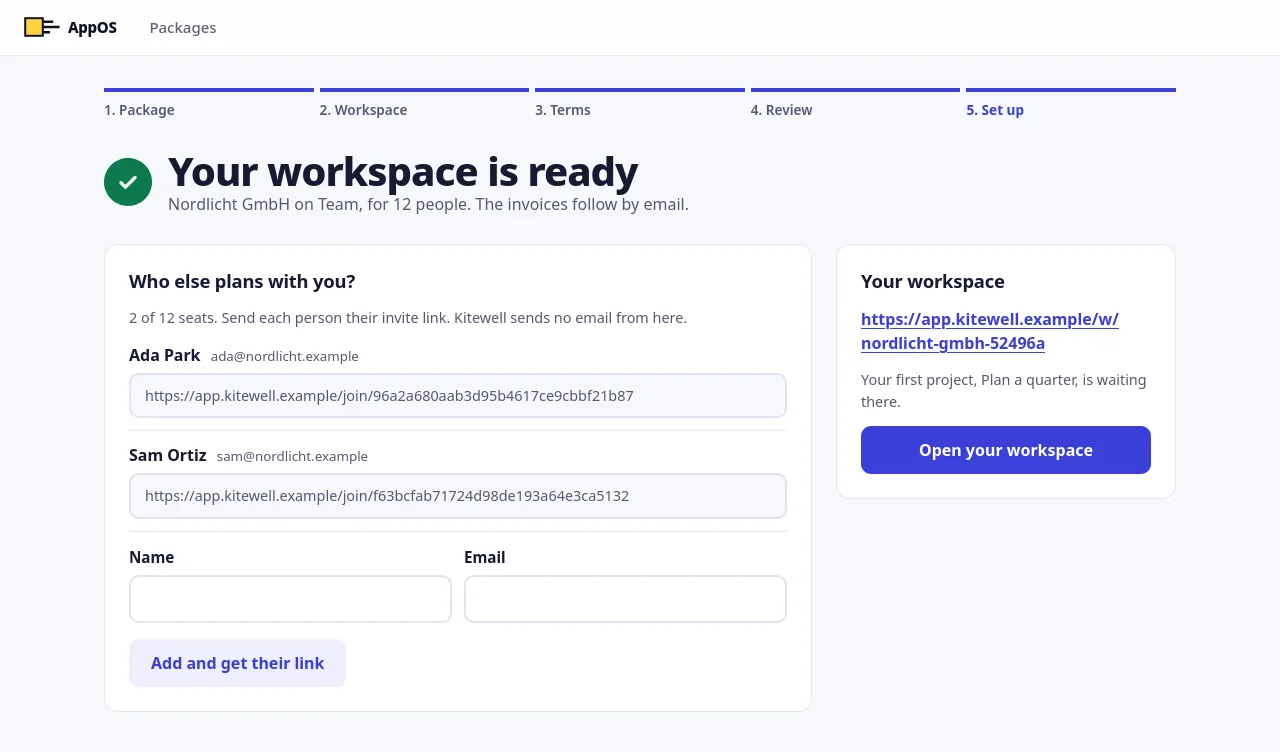
The set-up step is the workspace app again, at /workspace/setup. The customer adds their team and passes on the invite links, because Kitewell sends no email.
What runs in
the kitewell binary
Kitewell runs as one Rust binary that engineering builds and deploys. It holds three kinds of parts.
The shell
The shell is AppOS itself, the appos-shell crate. It routes requests, signs people in, checks the policy and runs each request to an app in a fresh WebAssembly sandbox. Kitewell uses it as it is.
The kit
kitewell:booking is the code engineering adds to the shell. Its WIT file is the contract the apps build against. Behind it are the catalog and the quote, the drafts and bookings in SQLite, and the platform’s own review page at /book.
The apps
packages and workspace are two WebAssembly components that sales and product build and deploy on their own. They reach the kit only through its WIT interfaces, and only the functions their grants allow.
Teams outside engineering never touch the binary. A new version of the packages app goes live with appos deploy while the platform keeps running, and the admin screen can roll it back or turn it off.
Engineering’s part
starts in main.rs.
A platform is a Rust program that builds the AppOS shell with its kits. Kitewell’s has one kit, the booking flow, and a list that says which app owns which step.
/// The slots apps own, at the path of each one's page; review is the
/// platform's own page, /book/<draft>.
const SLOTS: Slots = &[
    (Slot::Choose, "/packages"),
    (Slot::Configure, "/workspace/configure"),
    (Slot::Terms, "/packages/terms"),
    (Slot::Setup, "/workspace/setup"),
];
// …
#[tokio::main]
async fn main() {
    let db = std::env::var("KITEWELL_DB").unwrap_or_else(|_| ":memory:".into());
    let store = match store::Store::open(&db) {
        Ok(store) => store,
        Err(e) => {
            appos_shell::terminal_eprintln!("error: Kitewell's data at {db}: {e:#}");
            std::process::exit(1);
        }
    };
    appos_shell::Platform::new()
        .kit(Booking::new(store, SLOTS))
        .main()
        .await
}SLOTSlists the steps apps own, each with the path of its page. The first part of a path is the app’s id, so/packagesis the packages app. Review is not in the list, so it is the platform’s own page.- This line adds the kit, with its store and the slots. A platform adds each of its kits the same way.
main()takes the shell’s options, such as--dev,--authand--policy, and answersappos sync --shell, which gives an app the kit’s WIT.
The kit is a Rust type that implements the shell’s Kit trait. It names its WIT, its grants, the Rust function behind each WIT function and its own pages. The next two sections show the WIT and the grants.
The contract
between the teams
The kit describes its functions in WIT, the interface language of the WebAssembly component model. Each step is an interface of its own. An app gets the file with appos sync --shell, and appos dev and appos deploy warn when the app’s copy differs from the platform’s.
package kitewell:booking@0.1.0;
// …
/// A draft is the booking in progress. The platform keeps it under an id
/// that is hard to guess: whoever has the id may change the draft, so the
/// slots pass it on in their links. Each slot's functions are their own
/// interface with their own grant, so an app changes only the slots
/// policy.csv gives it. Prices are always the platform's: no function
/// takes one.
interface flow {
    enum plan { starter, team, business }

    enum billing { monthly, quarterly, yearly }

    enum payment-terms { net30, net45, net60 }

    enum slot { choose, configure, terms, review, setup }
    // …
    /// Plans, add-ons and templates. Grant booking-read.
    catalog: func() -> catalog-info;
    /// A draft; none for an unknown id. Grant booking-read.
    get: func(id: string) -> option<draft>;
    /// The path of a slot for a draft, to link to it: the app's page, or
    /// the platform's own for review. Grant booking-read.
    link: func(id: string, to: slot) -> string;
    /// The path of the slot after `after`, to send the customer on. Grant
    /// booking-read.
    next: func(id: string, after: slot) -> string;
    /// The booking, once the customer booked on the review page; none
    /// before. Grant booking-read.
    booked: func(id: string) -> option<booking>;
}
// …
/// Slot 1, sales. Grant booking-choose.
interface choose {
    use flow.{plan, draft};

    /// A new draft, with nothing chosen.
    start: func() -> draft;
    /// Sets the plan and the users, and drops an offer. `package` is the
    /// name sales shows. Errs with the reason in words, like "Starter is
    /// for up to 10 users".
    with-plan: func(id: string, plan: plan, users: u32, %package: string) -> result<draft, string>;
    /// Applies an approved offer by its code: it sets the package, the
    /// users and the terms it was approved for. Errs for an unknown or
    /// expired code.
    with-offer: func(id: string, code: string) -> result<draft, string>;
}
// …
/// Slot 2, product. Grant booking-configure.
interface configure {
    use flow.{draft};

    /// Turns an add-on on or off. Errs for an unknown add-on.
    with-add-on: func(id: string, add-on: string, on: bool) -> result<draft, string>;
    /// The starter template, or none. Errs for an unknown template.
    with-template: func(id: string, template: option<string>) -> result<draft, string>;
}- No function takes a price. An app sets the plan, the users, the add-ons and the terms, and the kit calculates the quote.
flow.nexttells a page where the customer goes after it, so no app needs to know who owns the next step.- A function that says no gives its reason in words. The apps show it as it is.
- Each step is its own interface with its own grant. The sales app has no grant for this one.
On the Rust side, the kit links each WIT function to the code behind it.
impl Kit for Booking {
    // …
    fn link(&self, linker: &mut KitLinker<'_>) -> anyhow::Result<()> {
        // …
        linker.func(FLOW, "next", move |_, (id, after): (String, Slot)| {
            answer!(Ok::<_, anyhow::Error>(b.next(&id, after)))
        })?;
        // …
        let b = self.clone();
        linker.func(
            CHOOSE,
            "with-plan",
            move |_, (id, plan, users, package): (String, Plan, u32, String)| {
                answer!(b.with_plan(&id, plan, users, &package))
            },
)?;linkconnects each WIT function to Rust.KitLinkerlinks only the functions the app holds a grant for, and AppOS checks the grant, the policy and the budget before each call reaches the kit.- The Rust behind it is plain code that checks the plan against the team size, saves the draft and answers with the draft and its quote.
Every call
is checked twice.
The kit names its grants and the functions each one allows. Before a call reaches the kit’s code, AppOS checks that the app holds the grant and that the policy lets this person use it in this app. The kit never checks permissions itself.
    fn grants(&self) -> Vec<Grant> {
            // …
            grant(
                "booking-choose",
                "Start a draft and set its package, or an offer: choose::start, with-plan, with-offer",
                "choose",
                &["start", "with-plan", "with-offer"],
                2,
            ),
            grant(
                "booking-configure",
                "Set a draft's add-ons and template: configure::with-add-on, with-template",
                "configure",
                &["with-add-on", "with-template"],
                2,
            ),
            // …
            Grant::new(
                PAGES,
                "Book on Kitewell's own page, /book: review and book",
                &[],
                1,
),- A grant has a name, a sentence that says what it allows, the functions it allows and a cost per call, which counts against the request’s I/O budget.
- There is one grant per step, so the policy can give each step to one app.
booking-bookallows no function. It is the grant for the kit’s own page at/book, where customers review and book.
Each app lists its grants in its manifest, app.toml, and says what data it keeps, where and why: the workspace app hands the booking kit the name and email address of each team member. The policy, policy.csv, says who may use them in which app. Customers book without signing in, so the booking grants belong to anyone, each one only in the app that needs it.
[app]
id = "packages"
name = "Packages"
version = "0.1.0"
owner = "Hannah Boateng <hannah.boateng@example.com>"
group = "Sales"
wasm = "target/wasm32-wasip2/release/packages.wasm"

[capabilities]
grant = ["booking-read", "booking-choose", "booking-terms"]

[[data]]
what = "The plan, offer and terms a customer picks; nothing about people"
where = "booking kit"
why = "Book the plan"[app]
id = "workspace"
name = "Workspace"
version = "0.1.0"
owner = "Jonas Berg <jonas.berg@example.com>"
group = "Product"
wasm = "target/workspace.wasm"
[capabilities]
grant = ["booking-read", "booking-configure", "booking-setup", "kv-read", "kv-write"]
[[data]]
what = "Name and email address of each team member the customer adds"
where = "booking kit"
why = "Set up the customer's workspace"
[[data]]
what = "Add-ons and template a customer picks, and which bookings are configured; nothing about people"
where = "booking kit and kv"
why = "Configure the workspace"# Who may do what on Kitewell's platform (kitewell --auth auth.toml
# --policy policy.csv). Customers book without signing in, so the booking's
# grants are anyone's, each only in the app that holds it: the sales app
# can't set the workspace, the product app can't change the terms. The
# platform's own booking page, review, is at /book. The admin screen is the
# platform team's (admin-read to look, admin-write to change); support may
# look at it but change nothing.
p, anyone, packages, booking-read
p, anyone, packages, booking-choose
p, anyone, packages, booking-terms
p, anyone, workspace, booking-read
p, anyone, workspace, booking-configure
p, anyone, workspace, booking-setup
p, anyone, workspace, kv-*
p, anyone, book, booking-book
p, group:platform, *, admin-*
p, group:support, *, admin-read| Grant | Allows | packages sales | workspace product |
|---|---|---|---|
booking-read | flow: catalog, get, link, next, booked | ✓yes | ✓yes |
booking-choose | choose: start, with-plan, with-offer | ✓yes | no |
booking-configure | configure: with-add-on, with-template | no | ✓yes |
booking-terms | terms: with-terms | ✓yes | no |
booking-setup | setup: add-member | no | ✓yes |
kv-read, kv-write | AppOS’s key-value store | no | ✓yes |
The first check happens when an app is loaded. If the sales app’s code used configure.with-add-on, AppOS would refuse to load it and say that the call needs booking-configure. The second check happens on every call. When the policy doesn’t let the person use the grant in this app, the call fails and AppOS ends the request.
The sales app,
in Rust
Hannah Boateng in sales owns the packages app, with the steps Package and Terms. The video at the top shows her changing it with her AI agent. What sales asked for is in packages/request.md, written the way a sales ops lead would write it. The handler below runs when a customer chooses a package.
use crate::appos::kitewell::booking::flow::{self, Billing, Draft, PaymentTerms, Slot};
use crate::appos::kitewell::booking::{choose, terms as kit_terms};
// …
pub fn choose(req: &Request) {
    let before = open(req.form("draft"));
    let typed = req.form("users").unwrap_or("");
    let Some(package) = req.form("package").and_then(domain::package) else {
        return again(req, before.as_ref(), typed, "Choose one of the packages");
    };
    let users = match domain::users(typed) {
        Ok(users) => users,
        Err(why) => return again(req, before.as_ref(), typed, why),
    };
    let catalog = flow::catalog();
    let plan = catalog.plans.iter().find(|p| p.plan == package.plan);
    if let Some(why) =
        plan.and_then(|p| domain::unavailable(package, p, users, catalog.enterprise_from))
    {
        return again(req, before.as_ref(), typed, &why);
    }
    let id = before
        .as_ref()
        .map_or_else(|| choose::start().id, |d| d.id.clone());
    if let Err(why) = choose::with_plan(&id, package.plan, users, package.name) {
        return again(req, flow::get(&id).as_ref(), typed, &why);
    }
    // A package starts with its own contract length: two years for the
    // Agency package. The customer changes it on the terms page.
    if before.as_ref().is_none_or(|d| d.package != package.name)
        && let Err(why) =
            kit_terms::with_terms(&id, Billing::Yearly, package.years, PaymentTerms::Net30)
    {
        log::warn(&format!("the {} package's terms: {why}", package.name));
    }
    page::redirect(&flow::next(&id, Slot::Choose));
}- The Rust bindings come from
booking.wit. A kit’s functions look like any other function. - The plans and their prices come from the kit, so the page shows the prices engineering set.
- The kit checks the plan against the team size. Its reason goes back on the page.
- The app doesn’t know which page comes next, so it asks
flow::next.
The pages are HTML from Askama templates, with htmx. When the customer moves the team-size slider, the app answers with only the parts that changed, the size field and the package cards, and the page updates without a reload. AppOS sends every page with a Content Security Policy that allows no scripts of the app’s own.
The product app,
in TypeScript
Jonas Berg in product owns the workspace app, with the steps Workspace and Set up. It is TypeScript, compiled to a WebAssembly component with scriptc, and AppOS runs it like the Rust app. Each step is a folder with a handler, use cases and views, and workspace/request.md is the product manager’s request.
import * as configure from "../../bindings/configure.ts";
import * as flow from "../../bindings/flow.ts";
// …
export function saveUc(id: string, choice: Choice): SaveResult {
  return saveU(id, choice, flow.get, flow.booked, flow.catalog, configure.withTemplate, configure.withAddOn, db.markConfigured);
}
// …
export function saveU(
  id: string,
  choice: Choice,
  get: (id: string) => Draft | undefined,
  booked: (id: string) => Booking | undefined,
  catalog: () => CatalogInfo,
  withTemplate: (id: string, template: string | undefined) => Result<Draft, string>,
  withAddOn: (id: string, addOn: string, on: boolean) => Result<Draft, string>,
  markConfigured: (id: string) => void,
): SaveResult {
  if (booked(id) !== undefined) return { ok: false, error: "booked" };
  const draft = get(id);
  if (draft === undefined) return { ok: false, error: "not-found" };
  let saved = withTemplate(id, choice.template);
  for (const addOn of catalog().addOns) {
    if (!saved.ok) break;
    // One that comes with the plan has no switch on the page.
    if (draft.plan !== undefined && addOn.includedIn.includes(draft.plan)) continue;
    saved = withAddOn(id, addOn.id, choice.addOns.includes(addOn.id));
  }
  if (!saved.ok) return { ok: false, error: "refused", why: saved.error };
  markConfigured(id);
  return { ok: true, draft: saved.value };
}- The TypeScript bindings come from the same
booking.wit. - The use case gets the kit’s functions as arguments, so its tests run without the platform.
- An add-on that comes with the plan has no switch on the page, so the app skips it.
The handler turns the use case’s answer into a page or a part of one.
export function save(req: Request): void {
  const id = form(req, "draft");
  if (!isDraftId(id)) return gone();
  const choice = parseChoice(req.form);
  const saved = saveUc(id, choice);
  if (saved.ok) {
    if (req.htmx) {
      // A switch or template changed: saved, and the price follows.
      page.setHtml("quote", quote(saved.draft).text);
      page.setHtml("configure_error", "");
    } else {
      page.redirect(flow.next(id, "configure"));
    }
    return;
  }
  switch (saved.error) {
    case "not-found":
      return gone();
    case "booked":
      return page.redirect(flow.link(id, "setup"));
    case "refused":
      page.setStatus(422);
      if (req.htmx) return page.setHtml("configure_error", saved.why);
      return showPage(req, id, saved.why);
  }
}- A switch sends an htmx request, and the answer replaces only the price beside the form.
- Like the sales app, the product app asks
flow.nextwhere the customer goes after its step. - A refusal is a 422 with the kit’s reason, shown next to the form.
The workspace app also keeps data of its own in AppOS’s key-value store: whether a customer has saved the page. That is why it holds kv-read and kv-write and the sales app doesn’t.
What happens when
a customer chooses Team
The sales app runs for this one request, and AppOS throws its sandbox away afterwards. The sandbox has no network and no files, so everything the app changed, it changed through the kit.
The app never decides which page comes next. flow.next answers with the page of the next step, and the order of the steps is the kit’s.
    /// The page of a slot an app owns; none for review, the platform's own.
    pub(crate) fn app_page(&self, slot: Slot) -> Option<&'static str> {
        self.slots
            .iter()
            .find(|(s, _)| *s == slot)
            .map(|(_, path)| *path)
    }

    /// Where a slot's page is for a draft: the app's, or the platform's
    /// own for review.
    pub(crate) fn link(&self, id: &str, to: Slot) -> String {
        match self.app_page(to) {
            Some(path) => format!("{path}?draft={id}"),
            None => format!("/book/{id}"),
        }
    }

    pub(crate) fn next(&self, id: &str, after: Slot) -> String {
        let next = match after {
            Slot::Choose => Slot::Configure,
            Slot::Configure => Slot::Terms,
            Slot::Terms => Slot::Review,
            Slot::Review | Slot::Setup => Slot::Setup,
        };
        self.link(id, next)
}- A step’s page is its path in
SLOTS, the page of the app that owns it. - Review is in no app’s hands, so its page is the platform’s.
- The order of the steps is the kit’s. No app can skip the review.
Run Kitewell
on your machine.
You need Rust, and Node.js 24 and Zig for the TypeScript app.
git clone https://github.com/StephanSchmidt/appos.git
cd appos
cargo build -p kitewell -p appos
export PATH=$PWD/target/debug:$PATH
(cd kitewell/packages && appos build)
(cd kitewell/workspace && npm install && appos build)
cd kitewell && kitewell --dev packages workspace
Then open http://127.0.0.1:8080/book and book a package. Try the offer codes KW-ACME-2026 and KW-NORDLICHT-2026, and KW-POLAR-2025, which has expired. Press Enter in the terminal to reload the apps after a rebuild. Drafts and bookings stay in memory, or in the SQLite file you name in KITEWELL_DB.
Where to read on
- wit/booking.wit
- The kit’s interface, which the apps build against.
- src/main.rs
- The platform with its kit, and where each step’s page is.
- src/booking.rs
- The kit, with its functions and grants.
- src/catalog.rs
- Plans, prices, offers and the quote.
- src/store.rs
- Drafts, offers, bookings and members in SQLite.
- src/pages.rs
- The platform’s own review page at
/book. - policy.csv
- Who may use which grant in which app.
- packages/
- The sales team’s app in Rust, with its request.
- workspace/
- The product team’s app in TypeScript, with its request.
The code on this page is from the AppOS main branch on 18 November 2026, shortened where a line says “…”. Read the Kitewell README ↗ · How AppOS works